
How to Start a Profitable Amazon FBA Business in 2026
Amazon FBA sellers moved over $140 billion in revenue in 2024. The sellers capturing a real share of that aren't lucky. They're running a repeatable system built on the right product, the right supplier, and an operation that doesn't fall apart under pressure.
This guide walks through that system step by step. From validating a product idea with data to launching with paid traffic. If you're starting from scratch or trying to fix what's already broken, this is where to begin.
What is Amazon FBA?
Amazon FBA stands for Fulfillment by Amazon. Sellers send their inventory to Amazon fulfillment centers. When a customer places an order. Amazon picks it from the warehouse and packs and ships the product. It also handles customer service and returns on your behalf.
This removes the logistics burden of the seller entirely and also gives products automatic access to Amazon Prime's two-day shipping network. This has a direct impact on conversion rates.
Key benefits for sellers
Prime eligibility: All FBA products qualify for free two-day shipping automatically. This significantly lifts conversion rates vs non-Prime listings.
Hands-off logistics: Amazon manages your entire fulfillment process through its global warehouse network.
Scalability: You focus on product research and brand growth instead of packaging and shipping orders yourself.
Step 1: How to find a profitable Amazon FBA product
Product research is the most important decision you'll make in your FBA business. A strong product with weak marketing will still sell. A weak product with strong marketing will drain your budget. You can't rely on gut feel. You need data.
What to look for
High demand, less competition: Look for niches with solid search volume but no dominant brand controlling the Buy Box.
Healthy profit margin: Use the Rule of Thirds as a starting benchmark. Because roughly one third of your selling price goes to production and shipping (landed cost). One third goes to Amazon FBA fees and referral fees. And one third is your target net profit. For example, you are selling a product at a $25 selling price. That means roughly $8 in landed cost, $8 in fees, and $8 in profit.
Compact and lightweight: Small, lightweight products reduce shipping costs and FBA storage fees significantly. Avoid oversized or fragile items as your first launch.
No licensing or safety hurdles: Steer clear of categories requiring certifications, patents, or heavy regulatory compliance until you have experience navigating them.
Tools to validate demand
Helium 10 or Jungle Scout for search volume, revenue estimates, and competitor analysis
Amazon's own Best Sellers and Movers & Shakers lists for trending categories
Google Trends to check whether demand is seasonal, declining, or growing
Step 2: How to source and manufacture your Amazon FBA product
Once you've identified a profitable product. You need a reliable manufacturing partner. This step determines your product quality, margins, and how well your supply chain holds up under pressure.
Finding suppliers
Alibaba and MadeinChina.com are the two main platforms for connecting with overseas manufacturers. Filter by verified supplier status and trade assurance.
Request quotes from at least three suppliers before making any decision. Compare lead times and minimum order quantities, not just unit price.
Qualifying before you commit
Order samples from your top two or three suppliers before placing any bulk order. Evaluate packaging, build quality, and consistency across units.
Hire a third-party inspection company (such as QIMA or Asia Inspection) to verify your inventory at the factory before it ships to Amazon. This catches quality issues before they become customer returns.
Building your product
Private labeling: Work with your supplier to add custom branding, logo, and packaging. This differentiates your product from generic competitors on the same listing type.
Lead time planning: Most overseas suppliers quote 20–30 days production time. Add 15–25 days for ocean freight and 7–14 days for FBA receiving. Plan at least 90 days ahead of any launch or major sales event.
Step 3: How to set up Amazon Seller Central
Seller Central is Amazon's seller dashboard. Where you manage listings, inventory, advertising, and payments, setting it up correctly from the start saves significant headaches later.
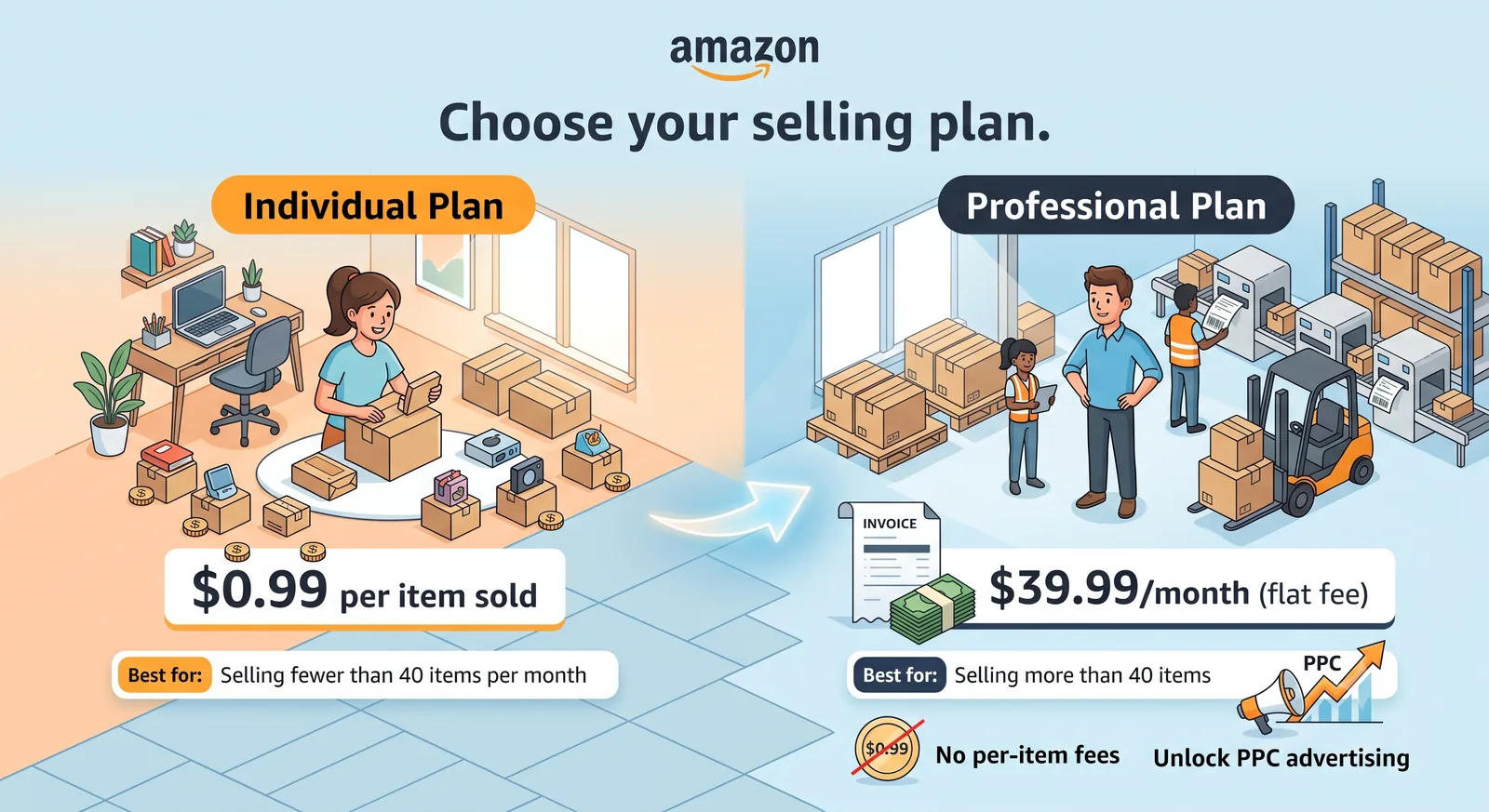
Choose your selling plan
Individual Plan
Cost: $0.99 per item sold
Best for: Selling fewer than 40 items per month.
Professional Plan
Cost: $39.99/month (flat fee)
Best for: Selling more than 40 items per month, eliminating the per-item fee and unlocking PPC advertising.
Amazon Brand Registry
If you have a registered trademark, enroll in Amazon Brand Registry. This unlocks A+ Content (enhanced product page layouts), Brand Analytics data, and protection against listing hijackers. They try to sell counterfeit products on your ASIN.
Product ID requirements
To add a product to Amazon's catalog. You need a valid Global Trade Item Number (GTIN). Either a UPC or EAN barcode. Purchase these through GS1 to ensure they are Amazon-recognized. Generic GTINs from third-party resellers are frequently rejected.
Step 4: How to write an SEO optimized Amazon product listing
Your product detail page is where search ranking meets conversion. Every element needs to work for both Amazon's ranking algorithm and the buyer reading it.
Product title
The title is the single most important ranking element on your listing.
Follow this format:
Brand + Product Type + Key Feature + Size or Color or Quantity.
Keep it under 200 characters and place your primary keyword within the first 80 characters. That's where mobile search cuts off.
Bullet points
Use all five bullet points. Lead each one with a benefit, not a feature.
For example: 'Leakproof lid keeps drinks hot for 12 hours' is better than 'Stainless steel vacuum-insulated lid.'
Include your secondary and long-tail keywords naturally across the five bullets. Do not stuff them.
Product images
Main image: white background only, product fills at least 85% of the frame. Amazon rejects images that fail this.
Secondary images: use these for infographics showing dimensions and key features, lifestyle shots showing the product in use, and size or compatibility charts.
Aim for at least six images total. Listings with more images consistently convert better.
Step 5: How to launch your Amazon FBA product with PPC
Listing a product without advertising it is not a launch strategy. Amazon's ranking algorithm relies heavily on sales velocity. And in a new listing's early weeks, paid traffic is how you generate that velocity before organic ranking kicks in.
Sponsored Products campaigns
Start with automatic targeting campaigns to let Amazon identify which search terms convert for your product. Run these for two to three weeks. Then pull the search term report and move your best-converting keywords into a manual campaign where you control the bids.
Sponsored Brands
Available once you have Brand Registry, Sponsored Brands ads display your logo and up to three products at the top of search results. Use these to build brand recognition once your product has reviews and a conversion rate worth sending traffic.
Review generation
Enroll in Amazon Vine to get your first verified reviews from Amazon's trusted reviewer program. Reviews are critical for conversion rate and Buy Box eligibility. Aim for at least 15 reviews before scaling your ad spend significantly.
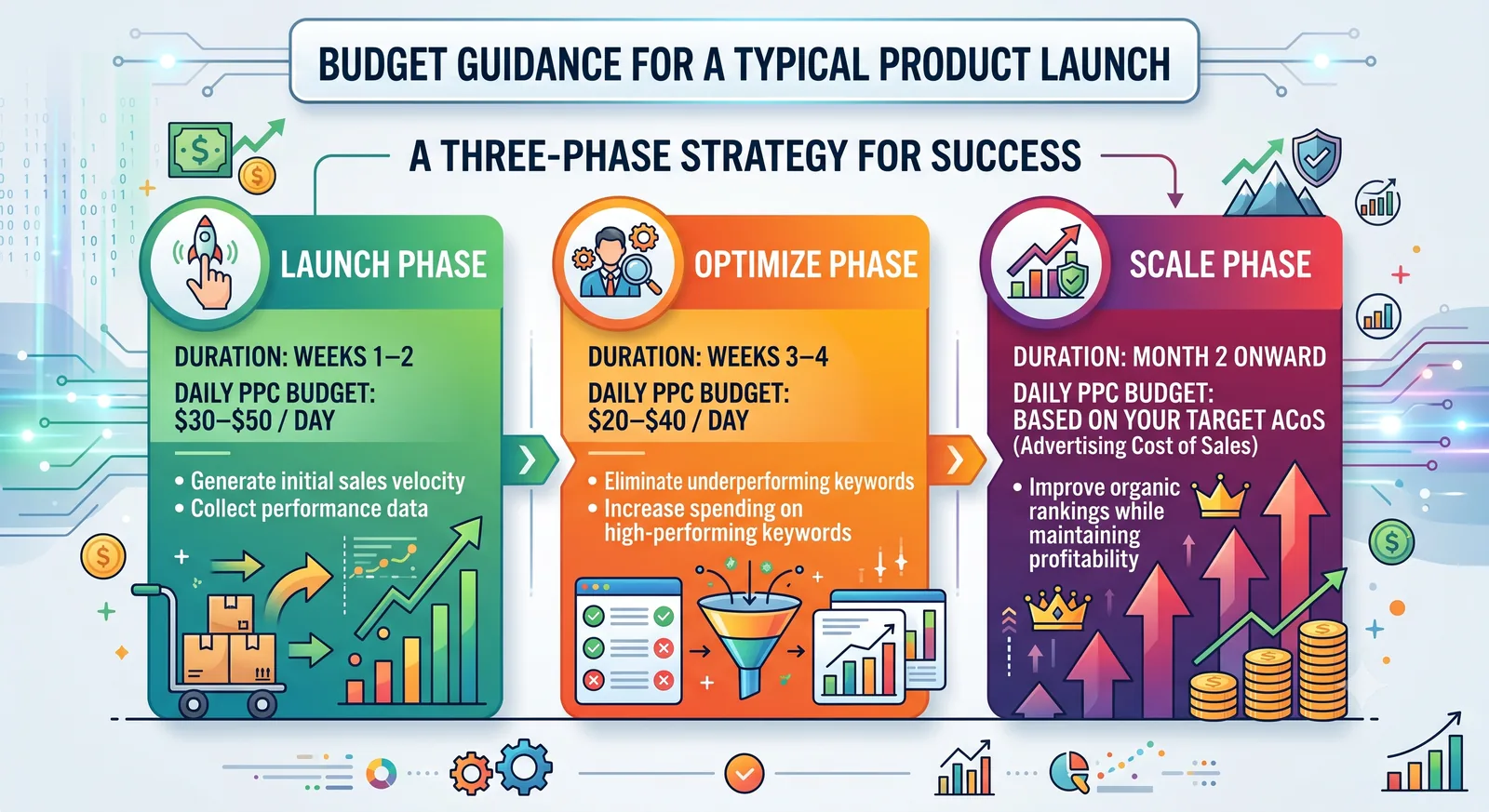
Budget guidance for a typical launch
Launch Phase
Duration: Weeks 1–2
Daily PPC budget: $30–$50/day
Goal: Generate initial sales velocity and collect performance data.
Optimize Phase
Duration: Weeks 3–4
Daily PPC budget: $20–$40/day
Goal: Eliminate underperforming keywords and increase spending on high-performing keywords.
Scale Phase
Duration: Month 2 onward
Daily PPC budget: Based on your target ACoS (Advertising Cost of Sales)
Goal: Improve organic rankings while maintaining profitability.
Let A2Z Supply Chain handle your FBA operations
Most FBA sellers lose time and margin not on the product side. But on the operations side, missed reorder points, inventory sitting in the wrong fulfillment center, suppliers going quiet on a shipment. Or a Prime Day stockout that takes three weeks to recover from.
A2Z Supply Chain runs the backend so you don't have to. One team, across every channel, round the clock.
What we manage
Inventory & Demand Planning: Reorder points, safety stock, and channel allocation so you never tie up cash in overstock or lose sales to an empty shelf.
Forecasting: Demand models built on your sales history, seasonality, and promotional lift. So you're planning against numbers, not spreadsheets and gut feel.
Logistics: Inbound freight, FBA shipment plans, 3PL coordination, and cross-docking managed end-to-end. So product moves on schedule and landed cost stays under control.
Supplier Coordination: Purchase orders, lead times, production schedules, and quality control managed so factories and freight stay in sync and problems get caught before they ship.
Round-the-Clock Communication: A dedicated operations team on Slack and email. In your timezone and your suppliers. Someone is always awake when a factory or carrier sends a message.