
How to Reduce Stockouts on Amazon FBA (Before They Kill Your Ranking)
Running out of stock on Amazon is not just a missed sale. It's a ranking problem that can follow your listing for weeks after you restock. Amazon's algorithm rewards consistent sales velocity, and a stockout tells the system exactly the opposite. That your product is not reliably available. Once your ranking drops, recovering it costs time, ad spend, and sometimes both.
The frustrating part is that most Amazon FBA stockouts are preventable. They don't happen because demand was impossible to predict. They happen because inventory planning didn't keep pace with the business.
Here's how to fix that:
Understand why FBA stockouts happen in the first place
Before you can solve the problem, it helps to know where the breakdown usually occurs. For most sellers, stockouts trace back to one of three places:
Lead times that aren't accounted for accurately
Reorder points set on outdated assumptions
Inbound shipments that take longer to get checked in than expected
The lead time issue is probably the most common. A supplier quotes you four weeks. You plan around four weeks. Then production runs a few days long, the freight forwarder has a scheduling gap, and customs takes an extra three days. Suddenly four weeks is six, and your inventory hits zero while the shipment is still in transit.
Amazon's inbound receiving time is the other one that catches people off guard. Once your shipment arrives at a fulfillment center, it doesn't immediately show as available inventory. FC check-in during busy periods Q4, post-Prime Day, any major sale event can take one to three weeks. If you're cutting it close on your reorder timeline, that receiving window is what tips you into a stockout.
Set reorder points that reflect reality, not optimism
A reorder point is the inventory level at which you trigger a new purchase order. Most sellers set this number once and leave it alone. That works fine until something changes, and something always changes.
Your reorder point should be calculated around three things: your average daily sales rate, your full replenishment lead time (supplier production plus freight plus FBA receiving), and a safety stock buffer that accounts for variability in both.
A simple formula that works well in practice:
Reorder Point = (Average Daily Sales x Lead Time in Days) + Safety Stock
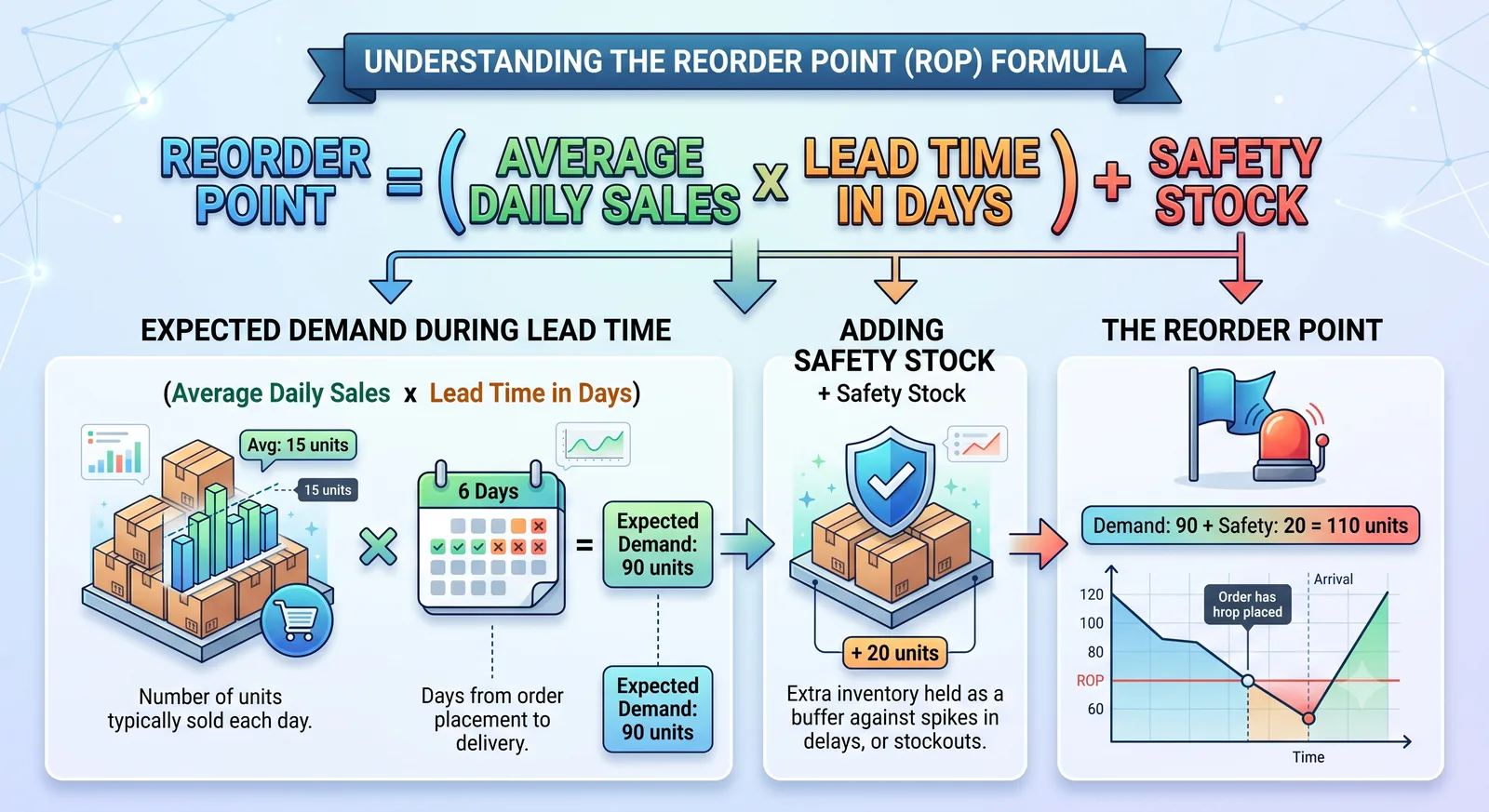
Safety stock itself depends on how much variability you're dealing with. If your supplier is consistently reliable and your sales are relatively predictable, a smaller buffer works. If lead times fluctuate or you're in a seasonal category, err on the higher side.
Revisit these numbers every quarter at minimum. A product that was selling 20 units a day in January might be selling 35 by March. If your reorder point never got updated, you're already behind.
Build lead time buffers into every purchase order
The single most practical thing you can do to reduce FBA stockouts is stop planning around best-case lead times and start planning around realistic ones.
Take your supplier's quoted lead time and add a buffer, typically 10 to 15 days for overseas manufacturing, less for domestic. Then add your average freight transit time, plus two to three weeks for FBA receiving during normal periods, and longer if you are shipping ahead of a major sales event.
Write that total number down somewhere visible when you're placing a purchase order. It is almost always longer than people instinctively assume, and that gap between assumption and reality is where stockouts live.
If you work with multiple suppliers, track actual lead times for each one separately. A supplier you've used twice isn't the same as a supplier with 18 months of order history, and treating them the same way is how you get surprised.
Use sales velocity data to forecast more accurately
Gut feel is not a forecasting method. It might work when you have two or three SKUs, and you know the business intimately. But it doesn't scale, and it doesn't account for trends you haven't consciously noticed yet.
Amazon Seller Central gives you sales data by day, week, and month. Use it. Look at your trailing 30, 60, and 90-day sales velocity for each product and use those numbers as the basis for your replenishment math rather than your memory of how things felt.
Pay attention to trends, not just averages. If a product has been climbing steadily over the last 60 days, an average of that whole period will actually underestimate where demand is heading. Weight your more recent data more heavily, or at least flag upward trends so you're ordering ahead of them rather than catching up to them.
Also watch for external signals: upcoming seasonal shifts, planned promotions, or any marketing spend you're about to increase. All of those affect sell-through rate, and none of them show up in historical data automatically.
Don't rely on a single supplier
Single-supplier dependency is a supply chain risk that often gets ignored until it becomes a crisis. If your one manufacturer has a production delay, a capacity problem, or a price dispute. You have no options. Your only move is to wait.
Having a qualified backup supplier, even one you have only placed a small test order with, changes that situation completely. You have not necessarily been using them regularly. But you know they can produce your product. You have seen their quality, and you can activate them if something goes wrong with your primary.
This takes some upfront effort: finding the supplier, sending samples, placing a small order, checking quality. Most sellers put it off because things are working fine. That is exactly when to do it.
Keep a close eye on your IPI score
Inventory Performance Index of Amazon is a metric that affects how much storage space you are allowed in fulfillment centers. Sellers with low IPI scores get storage limits placed on their accounts, which can actually prevent you from sending in enough inventory to avoid a stockout. Even if you have the stock ready to ship.
IPI is influenced by
Your sell-through rate.
Stranded inventory.
In-stock rate on your top ASINs.
Keeping it healthy isn't complicated, but it requires attention. Monitor it regularly in Seller Central, address any stranded listings quickly, and avoid letting slow-moving inventory sit in FBA for long periods without action.
What to do when a stockout is unavoidable
Sometimes, despite solid planning and going to go out of stock. Supplier issues, unexpected demand spikes, shipping delays. Things happen. When they do, a few things help minimize the damage.
First, use Amazon's "Restock Inventory" tool to flag the expected restock date. This doesn't fully protect your ranking, but it can help maintain some visibility while you're out of stock. Second, if you have enough margin to justify it, consider air freight for emergency replenishment on high-velocity products. The shipping cost often beats the cost of a prolonged stockout in terms of lost ranking and revenue. Third, if you sell on other channels alongside Amazon, consider temporarily redirecting inventory from those channels to cover Amazon while you wait for the next shipment.
None of these are perfect solutions. The better solution is not getting into the situation in the first place, which is why the planning side of this matters so much more than the recovery side.